.png)
Although this is not ordinarily required, on occasion you may need to manually import bank transactions. For example, if data has been delayed or if the job queue has failed.
-
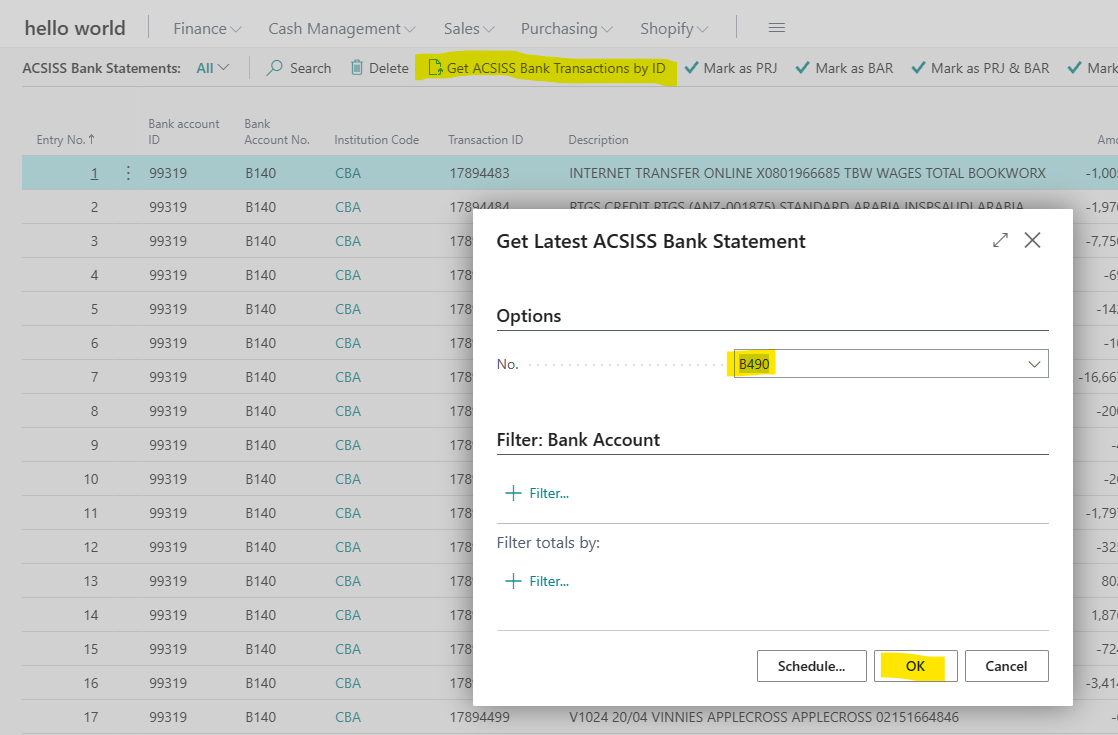
Go to ACSISS Bank Statements and click on Get ACSISS Bank Transaction by ID

-
Select the bank account from the No. drop-down list then click OK
Your transactions have now been imported
If there are no new transactions available since the last data import you will see a message “No transactions available at this time”
Related articles
- 1. Install ACSISS Connect
- 9. Import to Payment Reconciliations Journals
- 5. Schedule your Transaction Imports using the Job Queue
- 2. Register with SISS Data Services (CDR)
- 3. License the ACSISS Service
- D365 Business Central User Guide - up to v 1.0.11328.0
- 2. Register with SISS Data Services
- 1. Install ACSISS Connect (CDR)
- 10. Disconnect a Bank Feed
- 7. Manual data import to ACSISS Bank Statements
- 8. Import to Bank Account Reconciliations
- D365 Business Central User Guide - CDR and Direct feeds
- 3. License the ACSISS Service (CDR)
- 4. Give Consent for a Bank Feed (Direct feed only)
- 6. Using Bank Transactions (ACSISS Bank Statements menu)