.png)
Bank transactions are imported automatically, based on the job schedule setup in Step 5.
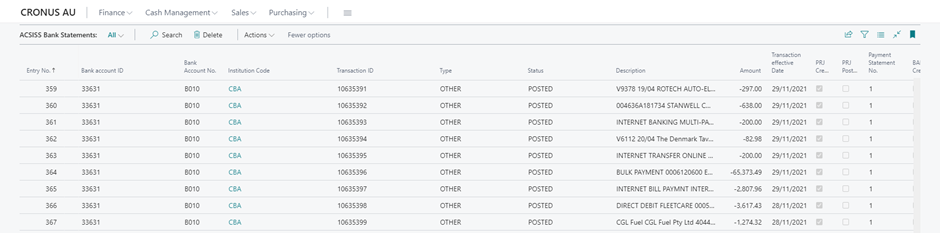
All transactions are stored in ACSISS Bank Statements. This table stores transactions for all bank feeds, beginning with the first transaction made since the feed has become active. Historical transactions are not available.
The Bank Account Reconciliations (BAR) and Payment Reconciliation Journal (PRJ) collect transactions from this table. The ACSISS Bank Statements table flags when a transaction has been collected and posted for both the Payment Reconciliation Journal and the Bank Account Reconciliation.
You are now ready to import transactions to the PRJ or the BAR
Related articles
- 1. Install ACSISS Connect
- 9. Import to Payment Reconciliations Journals
- 5. Schedule your Transaction Imports using the Job Queue
- 2. Register with SISS Data Services (CDR)
- 3. License the ACSISS Service
- D365 Business Central User Guide - up to v 1.0.11328.0
- 2. Register with SISS Data Services
- 1. Install ACSISS Connect (CDR)
- 10. Disconnect a Bank Feed
- 7. Manual data import to ACSISS Bank Statements
- 8. Import to Bank Account Reconciliations
- D365 Business Central User Guide - CDR and Direct feeds
- 3. License the ACSISS Service (CDR)
- 4. Give Consent for a Bank Feed (Direct feed only)
- 6. Using Bank Transactions (ACSISS Bank Statements menu)