.png)
ACSISS Connect bank feeds require consent from the account holder and approval from the bank.
Users cannot import transactions until a bank feed is Active.
Instructions
-
Go to Bank Accounts / Notice the new field ACSISS Banks Account Status, this field displays the status of your bank feed (it will be blank until the consent process is started)
-
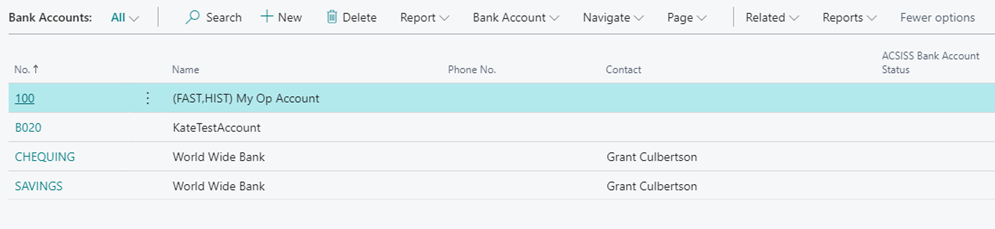
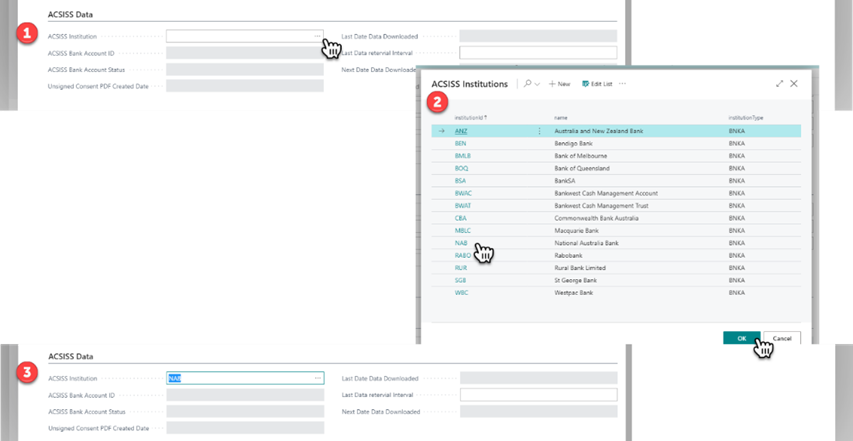
Select the bank account you want to give consent for the Bank Account Card will open / Scroll to the bottom, notice the new ACSISS Data section / click the ellipsis icon to display the list of available Institutions / select the corresponding institution or bank and click ok
-
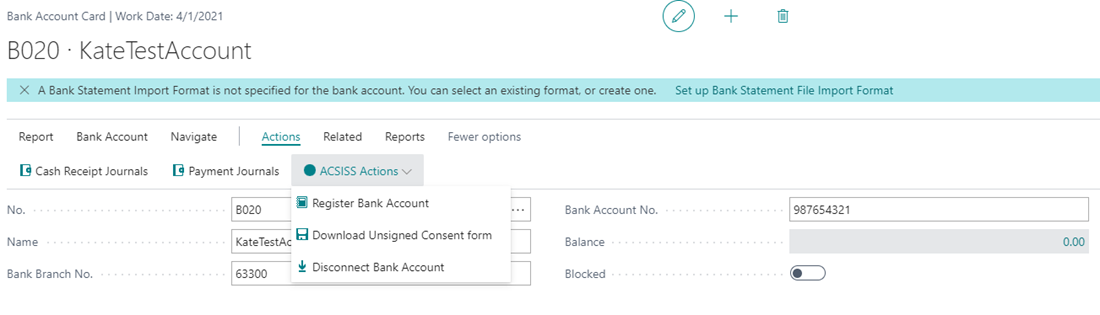
You will return to the Bank Account Card / click Actions / ACSISS Actions / Register Bank Account
-
Confirm the Bank Account details, a screen will be displayed that summarises the Bank Account details / Review, click Confirm / click Finish
-
A Customer Authority Form (CAF) will be generated, it is prepopulated with the corresponding bank account’s details; Account Name, BSB and Account Number. The CAF is downloaded automatically.
Each CAF is customised to its respective bank. ANZ and Westpac use an online consent process; a set of instructions will be generated instead of a CAF.
-
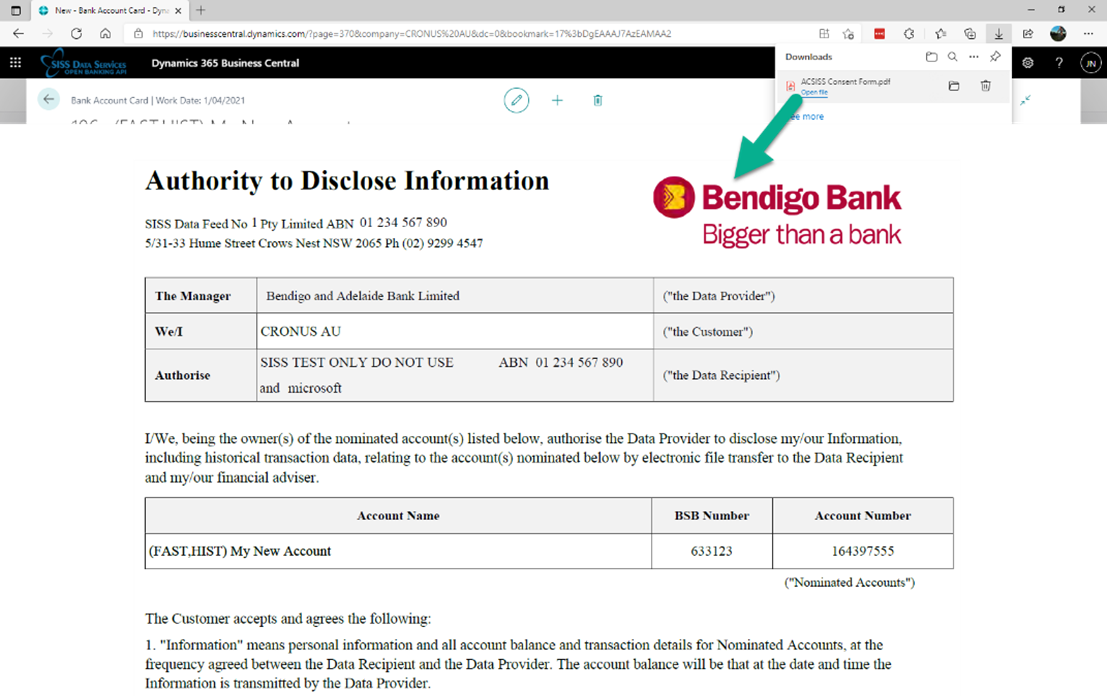
All accounts excluding ANZ and Westpac - Go to downloads / Print the form / Sign the form with ink / Send the form to SISS Data Services for processing:
Email: sissdataforms@siss.com.au
Fax: (02) 9439 4663
Post: Locked Bag 3060, Crows Nest, Sydney NSW 1585
Note: Each form is required to be printed and signed by pen (black or blue), and then scanned or photo sent to SISS. Please note under current law & bank requirements no form of digital signature is acceptable. accounts excluding ANZ and Westpac - Go to downloads / Print the form / Sign the form with ink / Send the form to SISS Data Services for processing:
ANZ and Westpac accounts only - Go to downloads / Print the form / Read the instructions / Follow the instructions for the bank’s online consent process
-
Return to the Bank Account Card / ACSISS Data / Notice the updated ACSISS Bank Account Status field; “Created”
This is also displayed in the Bank Accounts menu, seen in step 1
Your Consent process is complete; You are now ready to set up your job queue for importing transactions
Repeat the above steps for each account you want to setup a feed for
Bank Account Consent Status Flow
The bank feed status must be Active before you can import transactions
Created: The CAF for the account has been generated and downloaded
⬇
Received: The CAF has been received by SISS Data Services
⬇
Active: The consent has been approved by the bank
Related articles
- 1. Install ACSISS Connect
- 9. Import to Payment Reconciliations Journals
- 5. Schedule your Transaction Imports using the Job Queue
- 2. Register with SISS Data Services (CDR)
- 3. License the ACSISS Service
- D365 Business Central User Guide - up to v 1.0.11328.0
- 2. Register with SISS Data Services
- 1. Install ACSISS Connect (CDR)
- 10. Disconnect a Bank Feed
- 7. Manual data import to ACSISS Bank Statements
- 8. Import to Bank Account Reconciliations
- D365 Business Central User Guide - CDR and Direct feeds
- 3. License the ACSISS Service (CDR)
- 4. Give Consent for a Bank Feed (Direct feed only)
- 6. Using Bank Transactions (ACSISS Bank Statements menu)