.png)
Overview
There are two models for onboarding a software provider to the SISS Platform: Vendor and Practice.
The best model depends on how the provider’s software is built and how they intend to deploy Bank Feeds to their clients. This document explains both models, their respective trade-offs, and guides when to recommend each approach.
Comparison Summary
|
Area |
Vendor Model |
Practice Model |
|---|---|---|
|
Credential Management |
Master Vendor credentials are used to create separate credentials for each Practice |
Single set of Practice credentials for all Clients |
|
Data Separation |
Enforced at the credential / API level, with each Practice isolated |
Managed internally by the Practice, using Client/account mapping |
|
Deployment Type |
Best suited to distributed or independently deployed environments, such as on-premise installations |
Best suited to centralised, cloud-based platforms |
|
API Access |
API access is managed per Practice |
API access is managed centrally at the Practice level, with Client mapping handled internally |
|
Onboarding Effort |
Higher — credentials and setup required for each Practice |
Lower — single Practice setup and credentials |
|
Scalability |
More operational overhead as the number of Practices increases |
More scalable for platforms managing a large number of Clients |
|
Data Management Responsibility |
SISS provides Practice-level isolation through credentials and API access |
The software provider is responsible for ensuring correct Client-level data segregation |
|
Best For |
Distributed/on-premise environments or white-labelled solutions where each customer needs its own Practice identity and configuration |
Centralised cloud/SaaS platforms where multiple Clients are managed within one application |
The Practice model
How it works
The software provider (FINTECH) is onboarded to the SISS Platform as a Practice. A Practice creates and manages any number of Clients underneath it. Each Client is a distinct entity - typically a unique ID used to represent one of the Practice's, or Fintech’s own end customers.
The FINTECH uses a single set of Practice credentials to access Bank Feed data. Transactions for all connected clients can be retrieved through the Practice-level API access, with FINTECH responsible for mapping the transactions to the appropriate Client within its own application.
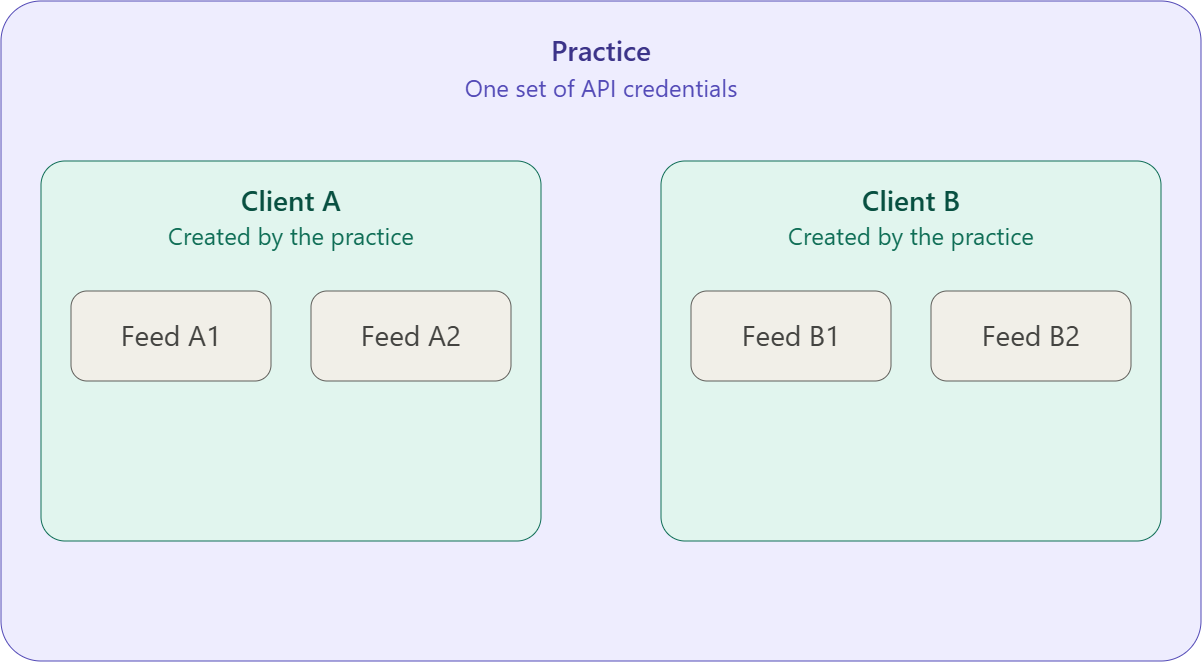
The Practice Model: Entity Hierarchy
-
Practice (top level)
A Practice is the organisation using the platform. It holds a single set of API credentials, which are used to authenticate all activity for every Client it manages.
-
Client (created by the Practice)
Using its API credentials, a Practice creates and manages any number of Clients underneath it. Each Client is a distinct entity — typically a unique ID used to represent one of the Practice's own end customers.
-
Bank Feed (created by the Client)
Each Client can have one or more bank feeds connected to it. A bank feed belongs to exactly one Client.
The Key Rule: Data Isolation Between Clients
Because all Clients sit under one set of Practice-level credentials, the Practice is responsible for keeping Client data properly segregated. Specifically:
-
Each bank feed must only be accessible to the Client it's attached to.
-
Client A must never be able to view, query, or otherwise access Client B's bank feeds - even though both were created using the same Practice credentials.
-
This isolation is an obligation on the Practice, not something the platform enforces automatically at the credential level - since one credential set spans many Clients, correct scoping of every request (making sure it's tied to the right Client ID) sits with the Practice's own implementation.
Pros
-
Simpler onboarding : FINTECH is onboarded once as a Practice, with no need to create and manage separate SISS credentials for each end client.
-
Simpler integration — FINTECH can access its clients’ Bank Feed data through a single Practice-level integration and map the data internally to the appropriate Client.
-
More scalable for cloud-based platforms — particularly where a centralised platform manages a large number of clients from a single application environment.
-
Centralised management — FINTECH can manage Bank Feed connections and client mapping centrally within its own platform.
-
Well suited to multi-client SaaS platforms — where clients are tenants or customers within a shared application environment.
Cons
-
Data separation is the provider’s responsibility — FINTECH must ensure transactions and account data are correctly mapped to and isolated between Clients within its application.
-
Greater reliance on application-level controls — SISS does not provide separate Practice-level credentials to enforce isolation between individual Clients.
-
Not well suited to independent on-premise deployments — where each end client operates its own software instance, server, network, or database and requires strong separation between environments.
-
Incorrect internal mapping can create data-access risks — because client-level separation is managed within FINTECH’s application rather than through separate SISS credentials.
Best for
|
Use case |
Why Practice is a good fit |
|---|---|
|
Cloud-based SaaS platform |
All customers use a centrally hosted application, making a single Practice-level SISS integration a natural fit. |
|
Multi-client platforms |
The software provider manages many organisations or end clients within one application and can map accounts and transactions internally to the correct Client. |
|
Accounting or financial platforms serving many businesses |
The provider can manage Bank Feed connections centrally rather than creating separate SISS credentials for every customer. |
|
Family office / wealth management platforms |
A single platform may manage multiple entities, accounts, or family groups, making centralised access and internal Client mapping more efficient. |
|
White-labelled SaaS where the provider centrally manages the platform |
If all white-labelled customers operate within the same underlying platform and the provider controls the data model and access controls, the Practice model can simplify onboarding and ongoing management. |
|
Large customer bases |
Avoiding separate SISS credentials and Practice setup for every customer makes the model more scalable as the number of clients grows. |
|
Platforms with strong internal tenant/data segregation |
Appropriate where the provider already has robust application-level controls to ensure each Client can only access its own accounts and transactions. |
|
Centralised API integration |
Suitable where the provider wants one SISS integration and will handle Client identification, account mapping and data segregation within its own application. |
The Vendor model
How it works
The software provider (e.g. FINTECH) is onboarded to the SISS Platform as a Vendor. The Vendor’s master credentials are used to create individual credentials for each Practice it onboards.
-
FINTECH, as the Vendor, creates credentials for each Practice it onboards (e.g. Family Practice A, Family Practice B).
-
Each Practice configures its system using the credentials created specifically for that Practice.
-
API calls are made in the context of each Practice, with each Practice able to retrieve only the transactions belonging to its own connected accounts.
-
Data separation is enforced at both the API and credential level, ensuring one Practice cannot access another Practice’s data.
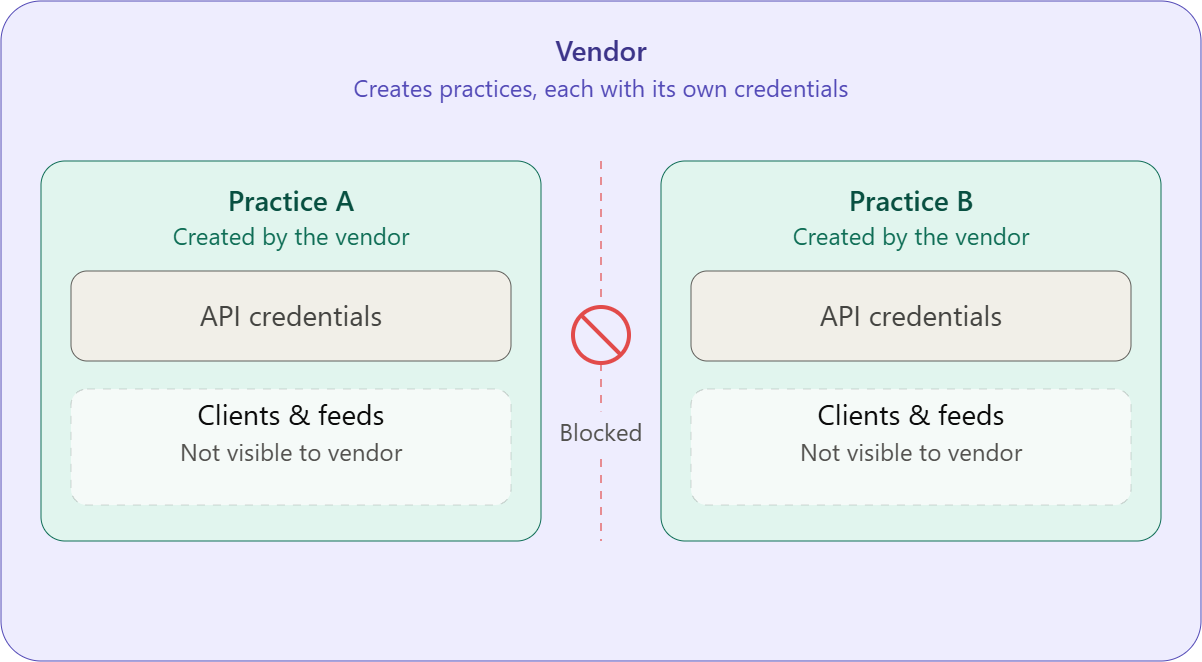
The Vendor Model: Entity Hierarchy
-
Vendor (top level)
A Vendor is the organisation at the top of this model. It creates Practices, but unlike the Practice model, it does not hold any shared credentials that reach down into their data. -
Practice (created by the Vendor)
Each Practice is created by the Vendor, and each one receives its own unique, independent set of API credentials at creation. These credentials belong to that Practice alone and are not shared with the Vendor or any other Practice. -
Client (created by the Practice)
Using its own unique credentials, a Practice creates and manages any number of Clients underneath it - the same as in the Practice model. -
Bank Feed (created by the Client)
Each Client can have one or more bank feeds connected to it, each belonging to exactly one Client.
The Key Rule: Data Separation Is Structural, Not Procedural
-
The Vendor cannot see a Practice's Clients, and cannot see any Client's bank feed data. It has no credential that grants it access to that layer at all.
-
Because each Practice's credentials are unique to it, there's no shared secret for a gap in process or implementation to leak across — separation between Practices is enforced by the architecture itself, not by each Practice remembering to scope its requests correctly.
-
The fintech building the integration is responsible for securely storing each Practice's unique credential set and using the correct one when making API calls on that Practice's behalf.
Pros
-
Strong data separation: each Practice has its own credentials, with access enforced at the credential and API level rather than relying solely on the Vendor’s internal application logic.
-
Works well with on-premises deployments: particularly where each Practice has its own separate software instance and environment.
-
Suitable for independently operated Practices: each Practice can be configured and managed separately without sharing credentials or data with other Practices.
-
Clear isolation between Practices: a Practice’s API access is limited to the accounts and data associated with that Practice.
Cons
-
Higher onboarding overhead: the Vendor must create and manage separate credentials for each Practice it onboards.
-
Credential management becomes a Vendor responsibility: the Vendor needs to ensure each Practice receives and configures the correct credentials.
-
More complex at scale: as the number of Practices increases, managing individual credentials and configurations can become operationally burdensome.
-
Separate API context per Practice: API access is established separately for each Practice, which can add complexity where a Vendor needs to manage or monitor many Practices.
Best for
|
Use case |
Why Vendor is a good fit |
|---|---|
|
On-premises or separately deployed software |
Each Practice has its own software installation, database, or environment. Practice-level SISS credentials align naturally with the way the software is deployed and provide clear separation. |
|
White-labelled software solutions |
The software provider offers its platform to multiple customers under their own branding. The Vendor model allows the software provider to remain the Vendor while each white-labelled customer is represented as a separate Practice with its own credentials and Bank Feed access. |
|
Practices that operate independently |
Each Practice manages its own Bank Feed connections, configuration, and users. Separate credentials ensure each Practice can access only its own data. |
|
Software requiring strong Practice-level isolation |
The provider wants data separation to be enforced by SISS at the credential and API level, rather than relying solely on its own application-level controls. |
|
Software with separate customer environments |
Where customers operate in distinct environments or instances, the Vendor model provides a clear one-to-one relationship between the customer environment and its SISS credentials. |
|
Providers managing a relatively small number of Practices |
The additional credential creation and management overhead is more manageable when the number of Practices is limited. |